How to use the wedding seating chart template
- Choose a template. Use the template above to fill it in online, or download a printable PDF for 8, 13, 15 or 20 tables, the Excel guest list or the Word version below.
- Make the room yours. Press Use this layout to keep the tables and remove the example guests, then change the number of tables, their size or their names.
- Add your guests. Paste your guest list from a spreadsheet or the Excel template. Households, plus-ones and children come across and stay together.
- Seat everyone. Press Smart arrange to seat every guest by your rules, then drag anyone you want to move.
- Print it. Download the PDF floor plan with a list for each table and an A–Z list, or make the sign in the seating chart sign maker.
The template above is a wedding of 84 with eight round tables of 10, a head table, a dance floor and a bar. Press Use this layout to keep the room and clear the example names, then add your own guests.
Printable wedding seating chart templates
Each PDF has the floor plan on the first page, then a numbered list for each table to fill in by hand.
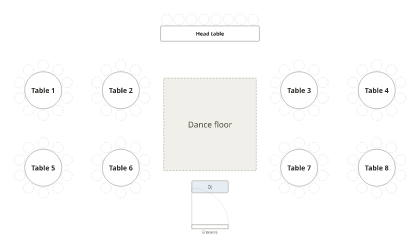
PDF, Letter · PDF, A4
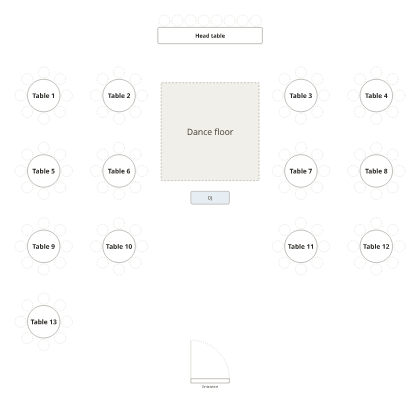
PDF, Letter · PDF, A4
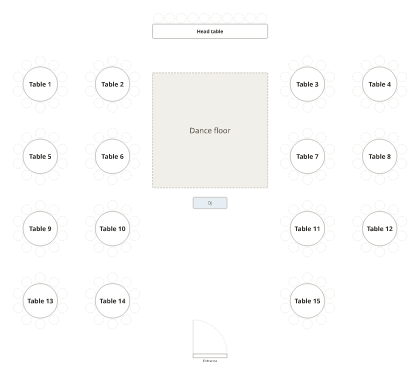
PDF, Letter · PDF, A4
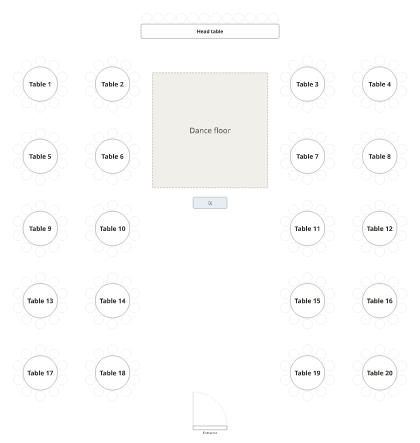
PDF, Letter · PDF, A4
Excel and Google Sheets template
Download the Excel template. The Guests sheet has one row per guest with columns for name, group (household or party), table, seat, who a plus-one is the guest of, whether they’re a child, and notes; a few example rows show the format. The Tables sheet lists every table and its seats. Fill it in, then come back, choose Add people and Import a file, or copy the rows and paste them: households stay together and Smart arrange seats everyone. To use Google Sheets, upload the file to Google Drive and open it with Google Sheets.
Word and Google Docs template
Download the Word template: a head table and ten tables of ten, each with numbered seats to type names beside. Copy or delete tables to match your room. It opens in Microsoft Word, Google Docs and Pages.
Which template fits your guest count?
| Guests | Tables of 10 | Tables of 8 | Start from |
|---|---|---|---|
| Up to 80 | 8 | 10 | 8 tables of 10 |
| About 100 | 10 | 13 | 13 tables of 8 |
| About 150 | 15 | 19 | 15 tables of 10 |
| About 200 | 20 | 25 | 20 tables of 10 |
Leave the head table out of the count, and keep a seat or two free for late replies.
After the template
- Make the sign for the entrance in the seating chart sign maker, by table or A–Z, at poster size.
- Print escort cards, place cards and table numbers with the seating card maker.
- Read how to make a wedding seating chart and who sits where.
Frequently asked questions
Is this wedding seating chart template free?
Yes. The online template, the PDFs, the Excel guest list and the Word version are all free, with no sign-up and no watermark.
Is there a wedding seating chart template in Excel?
Yes. The Excel template has a Guests sheet (name, group, table, seat, plus-one, child, notes) and a Tables sheet with every table and its seats. Fill it in, then import it here to seat everyone automatically.
Can I use it in Google Sheets or Google Docs?
Yes. Upload the Excel file to Google Drive and open it with Google Sheets, or open the Word file with Google Docs. Both keep their tables.
How many guests per table should the template have?
Ten at a 72-inch round table or eight at a 60-inch round. The PDFs include rooms of 8 tables of 10, 13 tables of 8, 15 tables of 10 and 20 tables of 10, each with a head table.
What if my wedding has long tables or a U-shape?
Use the template above: change the round tables to long tables or add a U-shaped table from the Add menu. Our guide to wedding reception table layouts shows each one drawn to scale. See reception table layouts.
Can I print the template and fill it in by hand?
Yes. Each PDF has the floor plan on the first page and a numbered list for each table after it, on Letter or A4.