How to make a Kagan seating chart
- Rank the class. List your students from highest to lowest on a recent assessment, and split the list into four equal quarters.
- Tag the quarters. Add the class above and tag each student with their quarter. Short neutral tags (A, B, C, D) keep the levels private.
- Make the teams. Keep a “spread evenly” rule for each quarter and press Smart arrange: every team of four gets one student from each quarter.
- Seat high and low diagonally. In each team, drag the highest and lowest students to opposite corners, so every pair of partners is one step apart.
- Number and print. Turn on seat numbers for Numbered Heads, then download the floor plan as a PDF.
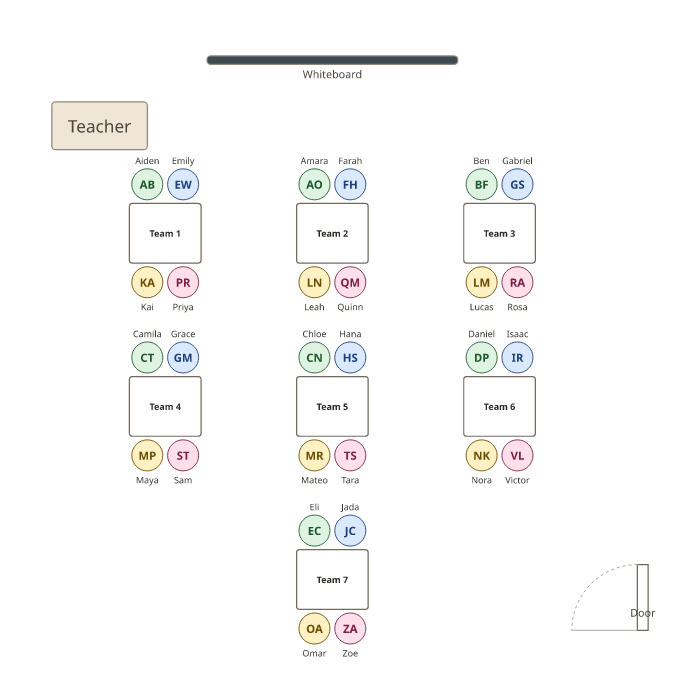
The chart above is a class of 28 in seven Kagan teams of four. Colours show each student’s quarter: high, medium-high, medium-low and low. Every team has one of each, with the high and low students in opposite corners. Press Use this layout to keep the teams and clear the example class.
How Kagan teams work
Kagan structures depend on heterogeneous teams: each team of four has a high achiever, two in the middle and one who needs more support, so every team can do the work and every student has someone to learn from. Partners matter too: shoulder partners sit side by side, face partners sit across the table. Seating the highest and lowest students diagonally means they are never direct partners, and each pair works across a small gap rather than a big one.
How the generator builds the teams
Tag each student with their quarter. The example has one spread evenly across tables rule per quarter, so Smart arrange puts one student from each quarter on every team, and also follows any keep-apart rules you add for students who shouldn’t work together. It doesn’t choose which corner each student sits in: after arranging, drag the high and low students of each team to opposite corners. Turn on Show seat numbers in diagram on each team for Numbered Heads Together.
Keep the levels private
Students shouldn’t be able to read their level off the wall chart. Use neutral tags (A, B, C, D) instead of “high” and “low”, and before printing untick A list for each table, which prints tags. The class list stays in your browser; nothing is uploaded. For more on how layouts affect learning, see what the research says about classroom seating.
Kagan seating chart templates
Example: PDF, Letter · PDF, A4 · Blank, seats numbered: Letter · A4
For other classroom layouts, use the classroom seating chart generator; for quick random teams, the random group generator.
Frequently asked questions
What is a Kagan seating chart?
A seating plan for Kagan cooperative learning: students sit in teams of four, and each team mixes abilities, with one student from each quarter of the class.
How are Kagan teams arranged?
Rank the class, split it into quarters (high, medium-high, medium-low, low), and give each team one from each. Seat the high and low students diagonally, so shoulder partners and face partners are never more than one step apart.
What if my class doesn’t divide by four?
Make a team or two of three, or of five. In the chart, change the seats at a team, or add or remove a group of desks, then press Smart arrange again.
How often should I change Kagan teams?
Many teachers keep teams for about five or six weeks, long enough to build teamwork, then re-rank and re-form them. Keep each version under My plans.
Will the ability levels show on the printed chart?
Tags print on the per-table lists in the PDF, so use neutral tags (A to D) or untick “A list for each table” before printing. The floor plan itself shows names only.
Is there a Kagan seating chart template?
Yes. Download the PDFs below, filled in or blank with seats numbered 1 to 4, or press Use this layout above to keep the seven teams and add your class.