How to make a banquet seating chart
- Pick a starting room. Start from Banquet rows (six long tables of 16) or Gala rounds (twelve round tables of 10), or start blank.
- Add your guests. Press Use this layout to clear the example names, then paste or import your list with each guest’s party, tags and notes.
- Set up the tables. Keep the example tables, change their seats, or add tables for your guest count. Add a head table from the Add menu if you need one.
- Seat everyone. Lock any reserved seats, add rules such as “keep together” or “keep apart”, and press Smart arrange. Check the list of anyone not seated.
- Print the views you need. Download the PDF floor plan and alphabetical list for guests, a per-table list for your team, and keep a plan file as a backup.
Long tables or round tables
The chart opens on Banquet rows: 96 guests at six long tables of 16, eight on each side and nobody at the ends, below a presentation area. Switch to Gala rounds for 120 guests at twelve round tables of 10 below a stage. Long tables fit more people in a narrow room and suit family-style service; round tables are better for conversation. Click any table to change its seats, turn end seats on, or rename it.
| Table in the chart | Seats | Good for |
|---|---|---|
| Round | Around the edge; 10 on a 72-inch table | Galas, awards dinners, conversation |
| Long | Both sides, end seats optional | Banquets, family-style dinners, narrow rooms |
| Head table | One side, facing the room | Hosts, speakers, the wedding party |
| U-shape | Around the outside | Award lunches with a speaker, board dinners |
Parties, sponsors and a head table
Give each guest a party (a company, a family, a club) and they sit together when they can; a keep together rule makes it a must, and keep apart separates two people. The examples show one of each. For a sponsor or VIP table, seat those guests yourself or lock their seats: a tag such as “VIP” only labels people. A head table is its own kind of table, with seats on one side; add it from the Add menu, choose its seats, and check your total seats afterwards.
From your guest spreadsheet to the room
Choose Add people and paste rows or import a CSV or Excel file. Map the columns you have: Name (or First and Last), Party or Household, Tags such as meal choices, Notes, and RSVP so declined guests stay out. Two guests with the same name stay two people. If your sheet already has table numbers, guests go to those tables. Try it with this sample guest list (CSV), made-up names only.
Scale up to a gala dinner
For a big event, start blank and use Tables for your guests: 400 guests at 10 per table adds 40 round tables, and the room grows to fit. It only adds tables, so remove the ones you won’t use. Then press Smart arrange and check the result: everyone seated, parties together, rules met. Use the list view or zoom to read every name; a full room printed on one page is a map, not a guest list.
Print the guest view and the team view
Download PDF prints the floor plan, an alphabetical find-your-seat list and a list for each table. The per-table list includes tags and notes, so it is for your team: untick it when you print for guests. For the entrance, the seating chart sign maker makes a poster by table or A–Z, and the seating card maker prints table numbers and place cards. Your plan stays in this browser; download the plan file to keep a backup.
Printable banquet and gala templates
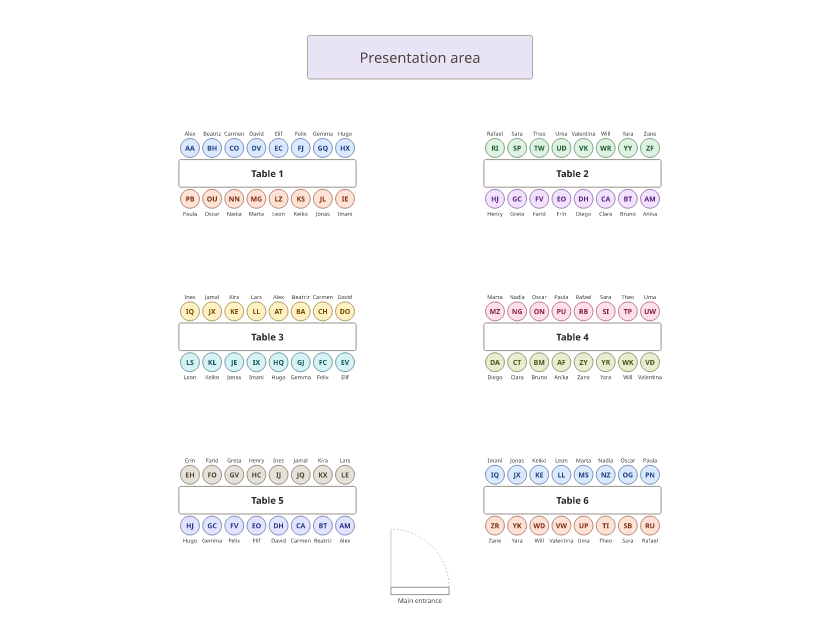
With names: Letter · A4 · Blank: Letter · A4
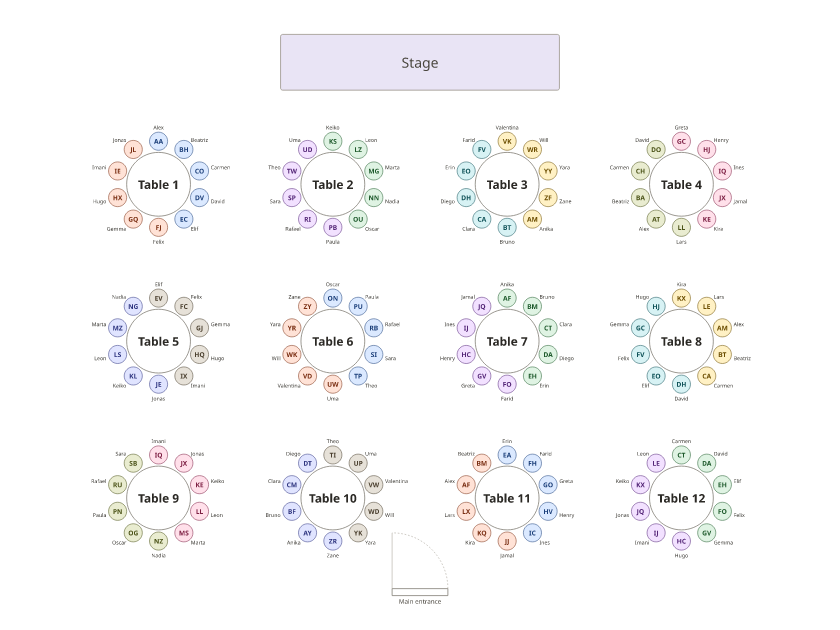
With names: Letter · A4 · Blank: Letter · A4
More: the event seating chart generator for any event, the table planner, and long table and round table templates to fill in by hand.
Frequently asked questions
Can I download a banquet or gala seating chart template?
Yes. Below the chart there are Letter and A4 PDFs of both examples, with names and blank. Press Use this layout to edit the same room online.
What types of banquet seating layout can I make?
Round tables, long tables with or without end seats, a head table with seats on one side, and U-shaped tables. Every size and seat count can be changed; the drawings are planning diagrams, not venue capacity approvals.
How many tables do I need for 400 guests?
40 tables of 10 if every seat can be used. Tables for your guests adds that many new tables; it doesn’t subtract tables you already have or set aside a head table, so plan those seats yourself.
Can I keep parties together and choose VIP tables?
Yes. Guests in the same party sit together when they can; a “keep together” rule makes it a must. Seat VIPs yourself or lock their seats. A tag on its own doesn’t move anyone.
Which printout goes to guests and which to the catering team?
Guests need the floor plan and the alphabetical find-your-seat list. The per-table list includes tags and notes, such as meals, so give it to your team only (untick it in Print & export for a guest copy). The alphabetical list shows seated guests only.
Can I use it for a wedding banquet?
Yes, the same tools work. The wedding seating chart generator starts from a wedding layout with a head table and dance floor. Open the wedding seating chart generator.
Where is my guest list saved?
In this browser, on this device; it isn’t uploaded. Download the plan file from Print & export to keep a backup or to open it on another computer.