How to use the classroom seating chart template
- Pick a layout. Use the template above, or choose rows, pairs, groups of four or a U-shape from the examples.
- Clear the example class. Press Use this layout to keep the desks and remove the example names, then add or move desks to match your room.
- Add your class list. Paste names from your school system or a spreadsheet, or import the Excel roster template.
- Seat your students. Press Smart arrange to follow your rules (keep apart, front row) or Shuffle for a random chart.
- Print it. Download the PDF floor plan for the wall or a substitute folder, or print a blank template below and fill it in by hand.
The template above is a class of 28 in rows of single desks facing the whiteboard. Press Use this layout to keep the desks and clear the example names, or pick pairs, groups or a U-shape from the examples.
Printable classroom seating chart templates
Each PDF has the floor plan with numbered desks, then a roster page to write each student beside their seat. Letter and A4.
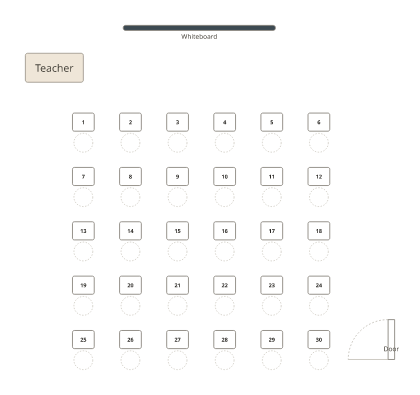
PDF, Letter · PDF, A4
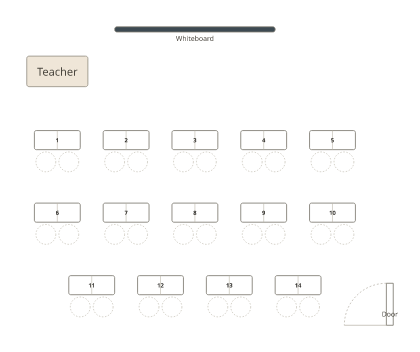
PDF, Letter · PDF, A4
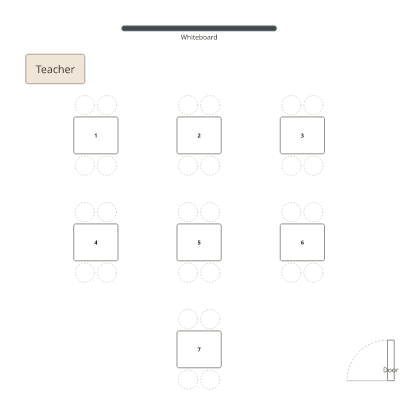
PDF, Letter · PDF, A4
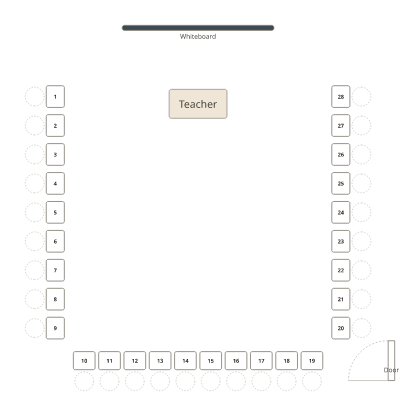
PDF, Letter · PDF, A4
Word and Google Docs template
Download the Word template: a grid of 30 numbered desks (six columns, five rows) under “Front of the room”, with a line in each desk for a name. Add or delete rows and columns to match your room. To use Google Docs, upload it to Google Drive and open it with Google Docs.
Excel and Google Sheets class roster
Download the Excel roster: one row per student, with a Tags column for needs such as “Needs front row”, and a Tables sheet listing all 30 desks. Fill it in, then choose Add people and Import a file above to seat the class automatically.
Templates for 20 to 30 students
| Students | Rows | Pairs | Groups of four |
|---|---|---|---|
| 20 | 5 × 4 | 10 | 5 |
| 24 | 6 × 4 | 12 | 6 |
| 26 to 28 | 7 × 4 | 13 to 14 | 7 |
| 30 | 6 × 5 | 15 | 8 (six of four, two of three) |
For what each layout is good for, see classroom seating arrangement ideas and what the research says. To keep the chart in your school system too, see seating charts in PowerSchool, Skyward, Schoology and Focus.
Frequently asked questions
Is this classroom seating chart template free?
Yes. The online template and every download (PDF, Word and Excel) are free, with no sign-up and no watermark.
Is there a classroom seating chart template for Google Docs?
Yes. Upload the Word template to Google Drive and open it with Google Docs: it keeps the grid of desks. The Excel roster opens in Google Sheets the same way.
Can I edit the template?
Yes. Edit it online above (move, add or delete desks and type names), or download the Word version and type into each desk.
Is there a template for groups of four or a U-shape?
Yes. The printable PDFs come in rows, pairs, groups of four and a U-shape, each with a floor plan and a roster page.
What layout fits 24, 28 or 30 students?
Rows of 6 by 4 seat 24 and 6 by 5 seat 30; 14 pairs or 7 groups of four seat 28. Change the number of desks in the template above to fit your class exactly.
Do my students’ names leave my computer?
No. The online template keeps your class in your browser; names aren’t uploaded to our servers.