The Knot Seating Chart: What Changed
The Knot’s seating chart link now goes to its wedding website builder. Here’s a free way to make the chart from your guest list, without an account.
Checked on October 18, 2026, on theknot.com. This site isn’t affiliated with The Knot.
What you’ll find on The Knot now
The Knot’s seating chart address (theknot.com/gs/seating-chart) now redirects to its free wedding website page, which offers website designs and RSVPs and doesn’t mention seating. The Knot still publishes seating advice, such as its articles on seating chart etiquette and king’s tables.
Make the seating chart here
- Free, no account. Your plans stay in your own browser.
- Seats guests for you. Smart arrange keeps households together and follows rules, such as keeping two guests apart or seating grandparents near you.
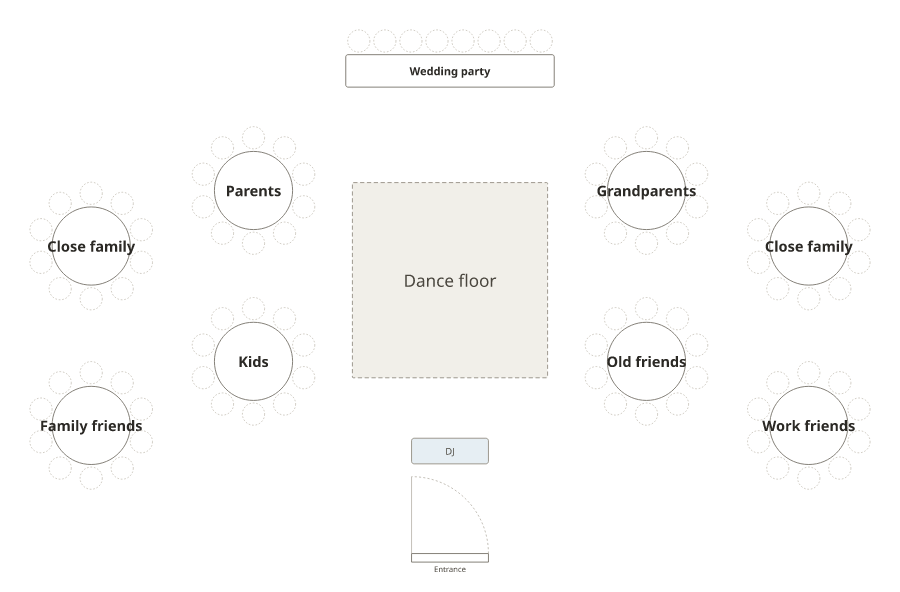
- A real floor plan: round and long tables, a head table, the dance floor, bar and doors.
- Everything to print: the floor plan, an A–Z list, lists for each table with meals, and a sign.
From your guest list to a chart
- Take your guest list from The Knot (export it if your account offers that, or copy it) or from your own spreadsheet.
- Paste it into the wedding seating chart generator, one guest per line, with households if you have them.
- Set your tables, add a few rules and press Smart arrange.
- Drag anyone you want to move, then download the PDF.
Templates and printing
Instead of filling in a template by hand, make the sign from the plan in the seating chart sign maker: by table or A–Z, four styles, poster sizes from 11 × 17 in to 24 × 36 in, and a mirror style. For more, see wedding seating chart ideas and what size the sign should be. Comparing other wedding sites? See our Zola and WeddingWire comparisons.
Frequently asked questions
Does The Knot still have a seating chart tool?
The Knot’s old seating chart address now redirects to its free wedding website page, which doesn’t mention seating. The Knot still publishes seating advice articles.
How do I make a seating chart if my guest list is on The Knot?
Take your guest list out of The Knot (export it if your account offers that, or copy it), paste it into a seating chart generator, add your tables and let it seat everyone.
Is there a free seating chart template like The Knot’s?
The wedding seating chart generator here is free and needs no account. Instead of a fixed template, it builds the chart from your guest list and prints a sign by table or A–Z.
Is there a seating chart app?
The seating chart generator works in your phone’s browser with nothing to install, and you can share a read-only link so guests can look up their seat.