WeddingWire Seating Chart Tool: an Honest Comparison
What WeddingWire’s free seating chart does well, where it stops, and when a seating chart generator with automatic seating and no account is the better fit.
Checked on October 18, 2026, from WeddingWire’s public seating chart page. Features change; check their site. This site isn’t affiliated with WeddingWire.
The short answer
- WeddingWire’s seating chart is free and part of a wedding planning account. It’s best if your guest list and RSVPs already live in WeddingWire.
- A seating chart generator works with any guest list, without an account, and seats everyone for you by your rules.
Where WeddingWire is better
- One planning account. The seating chart syncs with WeddingWire’s guest list and RSVPs, next to its checklist, budget, vendor manager and wedding website.
- Several events. Seating for each of your wedding events, not only the reception.
- An app. Plan on your phone with the WeddingWire app.
- Sharing. Print, email or export the chart, as a picture or a list.
Where a seating chart generator is better
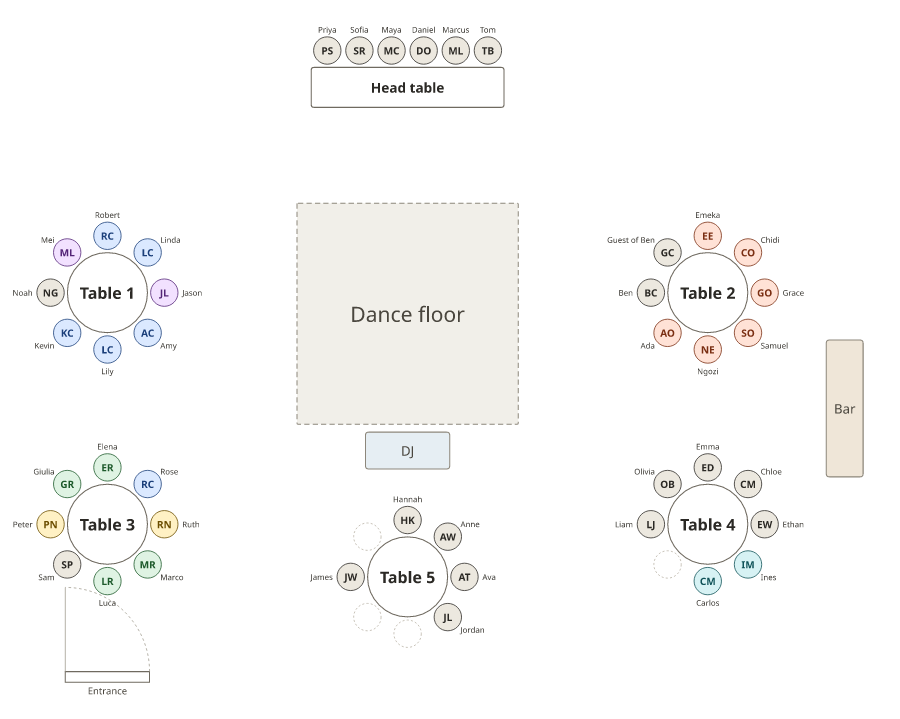
- Automatic seating. Smart arrange seats everyone, keeps households together and follows rules: keep two guests apart, seat grandparents near you, keep a group together.
- No account. Open it and start; your plans stay in your own browser.
- Any guest list. Paste from a spreadsheet, another planning site or your notes.
- Everything from one plan. The floor plan, an A–Z list for the entrance, lists for each table with meals for the caterer, and the sign.
Side by side
| Feature | WeddingWire | Seating chart generator (this site) |
|---|---|---|
| Cost | Free | Free |
| Account | Sign up with name and email | None |
| Guest list | Synced with WeddingWire’s guest list | Pasted or imported from a spreadsheet |
| Seating guests | Drag and drop | Smart arrange with rules, plus drag and drop |
| Floor plan | Tables, dance floor, DJ booth | Tables, head table, dance floor, DJ, bar, doors, to scale |
| Several events | Yes | One plan per event |
| Outputs | Print, email, export (chart or list) | PDF floor plan, A–Z and per-table lists, sign, PNG, SVG, CSV, read-only link |
| Other events | Weddings | Weddings, classrooms, galas, bands and more |
How the WeddingWire seating chart works
- Sign up or log in, and add your guests (or use your WeddingWire guest list).
- Create the floor plan: tables, a dance floor, a DJ booth and other areas.
- Drag and drop guests into their seats; switch between chart view and list view.
- Print, email or export the chart for your planner and venue.
Using your WeddingWire list here
- Take your guest list out of WeddingWire (export it if your account offers that, or copy it), or use the spreadsheet you keep it in.
- Paste it into the wedding seating chart generator; keep one row per guest, with a household column if you have one.
- Add your tables, set a few rules and press Smart arrange.
For the whole process, see how to make a wedding seating chart and wedding seating chart etiquette.
Frequently asked questions
Is the WeddingWire seating chart tool free?
Yes. WeddingWire says its Seating Chart tool is free. You sign up with your name and email to use it, as part of a WeddingWire planning account.
Does WeddingWire seat guests automatically?
Its seating chart page describes dragging and dropping guests into seats; it doesn’t mention automatic seating or rules. The seating chart generator on this site has Smart arrange, which seats everyone by your rules.
Is the WeddingWire seating chart in the app?
WeddingWire has a planning app, and its seating chart is part of the same account as the guest list.
Can I move my WeddingWire guest list to another seating chart tool?
Yes, if you export or copy your guest list from WeddingWire. Paste the names (with households, if you have them) into the wedding seating chart generator here.
Which is better for a wedding seating chart?
If you plan everything in WeddingWire, its seating chart stays in sync with your guest list and RSVPs. If you want automatic seating with rules, no account, or the sign and caterer lists from the same plan, use a seating chart generator.