Zola Seating Chart: an Honest Comparison
What Zola’s wedding seating chart does well, where it stops, and when a free seating chart generator with automatic seating and no account fits better.
Checked on October 18, 2026, from Zola’s public seating chart page. Features change; check their site. This site isn’t affiliated with Zola.
The short answer
- Zola’s seating chart is built into a Zola wedding account. If your guest list and RSVPs are already in Zola, it saves you typing.
- A seating chart generator works with any guest list, without an account, and seats everyone for you by your rules.
Where Zola is better
- No guest list to enter. Confirmed guests come in automatically from your Zola guest list, already grouped as family, coworkers, college friends and so on.
- Several events. Separate floor plans for the ceremony, rehearsal dinner and reception.
- Meals and labels. Tag guests by meal choice, dietary restriction or custom labels.
- An iOS app, and the rest of Zola’s wedding tools (website, registry) in the same account.
Where a seating chart generator is better
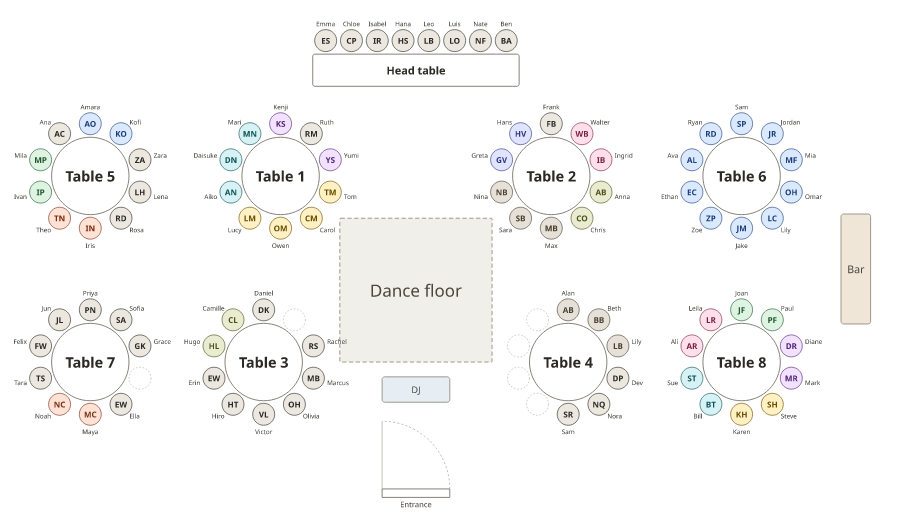
- Automatic seating with rules. Smart arrange seats everyone, keeps households together and follows rules: keep apart, keep together, seat near someone.
- No account, any list. Paste guests from a spreadsheet or any planning site; your plans stay in your browser.
- Everything from one plan. Floor plan, an A–Z list for the entrance, per-table lists with meal counts, and a sign in four styles at print sizes.
- Not only weddings. The same tool does classrooms, galas, bands and more.
Side by side
| Feature | Zola | Seating chart generator (this site) |
|---|---|---|
| Account | Zola wedding account | None |
| Guest list | Pulled from Zola automatically | Pasted or imported from a spreadsheet |
| Seating | Seat groups, then fine-tune by hand | Smart arrange with rules, then fine-tune by hand |
| Floor plan | Round and rectangular tables, dance floor, bar, cake and head table | Round, long, head and U-shape tables, dance floor, bar, DJ, doors, to scale |
| Several events | Yes, separate floor plans | One plan per event |
| Meals | Meal and dietary tags | Meals and tags, with meal counts per table |
| Outputs | Print-ready PDF | PDF floor plan and lists, sign, PNG, SVG, CSV, read-only link |
| Price | Not stated on the page | Free |
How Zola’s seating chart works
- Your confirmed guests come in from your Zola guest list, grouped.
- Build the floor plan: drag in tables, set seat counts, add the dance floor, bar, cake table and head table.
- Seat families and friends, then refine with group tags, dietary restrictions or custom labels.
- Download a print-ready PDF for your venue, planner or coordinator.
Comparing other wedding sites? See our WeddingWire seating chart comparison, and for the seating itself, wedding seating chart etiquette.
Frequently asked questions
Does the Zola seating chart work without a Zola account?
No. It pulls your confirmed guests from your Zola guest list, so it works inside a Zola wedding account. The seating chart generator on this site works without an account.
Does Zola seat guests automatically?
Zola brings in your confirmed guests already grouped, and you seat the groups and then fine-tune seats yourself. Its page doesn’t describe automatic seating by rules. Smart arrange in the generator here seats everyone and follows rules such as keeping two guests apart.
Is there a Zola seating chart app?
Yes. Zola’s seating chart page invites you to try it in Zola’s iOS app.
Is the Zola seating chart free?
Zola’s seating chart page doesn’t state a price or a guest limit. Check the app or your Zola account for current terms. The generator on this site is free.
Does Zola have a wedding seating chart template?
Zola gives you a floor plan you build with round or rectangular tables and areas such as the dance floor, bar, cake table and head table, rather than a fixed template, and a print-ready PDF.