Classroom Seating Apps Compared: Clickschool and More
Five classroom seating tools teachers search for, from Clickschool’s free seating planner to Shuffle Buddy and Gynzy: what each does well, what it costs, and the catches.
Checked on October 18, 2026, from each tool’s public website or help pages. Features and prices change; check their sites. This site isn’t affiliated with any of them.
At a glance
| Tool | Cost | Best at |
|---|---|---|
| Clickschool | Free | Grouping or spreading students by attributes |
| Shuffle Buddy | Free core; Pro $29.99/yr | Random charts that follow rules |
| Gynzy | Part of Gynzy | Showing the chart on the whiteboard |
| Classroomscreen | Part of Classroomscreen | A chart on the class screen |
| Seating Plan | Free (one plan); paid | Whole-school data and attendance |
| This site | Free | Rules, avoiding repeats, no account |
Each tool’s catches are in its section below.
Clickschool Seating Planner
- Does well: free with no login, and plan data stays on your computer. Paste “LAST, first” names from a spreadsheet, add your own columns (such as SEN or ability) shown as short tags or icons, then auto-position A–Z, at random, or by grouping and distributing students by those columns. You can flip the view for the projector and pick a random student.
- Watch out: its own notes call it an alpha release from 2017, recommend Chrome, and warn that refreshing the page loses your data. Save the plan as a file and load it next time.
Shuffle Buddy
- Does well: random seating charts that always follow your rules (accommodations, keep together, keep apart), random groups and a random-student wheel, with roster import. Core features are free, and it was built by a teacher.
- Watch out: moving students by hand after a shuffle, colour-coded or labelled desks, attendance and multi-device sync are in Pro ($3.99 a month or $29.99 a year).
Gynzy
- Does well: a classroom floor plan with furniture you can rotate and resize, students dragged onto desks, colours for groups or levels, shuffle, several saved charts, and printing. It’s made to be shown on the interactive whiteboard so students can find their seats.
- Watch out: it’s part of Gynzy’s wider whiteboard platform. Placement is by hand or random shuffle; its help article doesn’t describe seating rules.
Classroomscreen
- Does well: a seating chart maker template on the class screen, with screens for paired rows, table groups, flexible seating and a custom layout, plus Classroomscreen’s group maker and randomizer.
- Watch out: the room is built from stickers and name labels, so there’s no automatic seating by rules.
Seating Plan (ex-Mega Seating Plan)
The most complete school platform: rosters synced from school systems, student data on the chart, preferences, behaviour and attendance. It needs an account, and the free plan has one seating plan. See our Mega Seating Plan comparison.
This site’s classroom generator
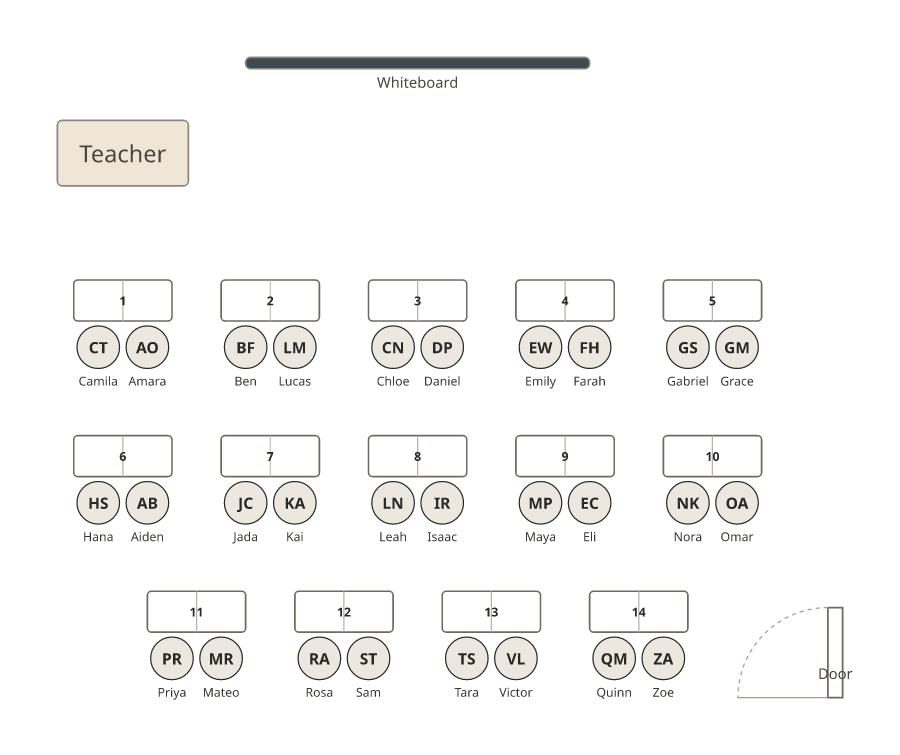
- Free, no account, and your plans are saved in your browser, so a refresh doesn’t lose them.
- Rules: keep apart, keep together, front row, and shuffles that avoid last time’s neighbours.
- Layouts: rows, pairs, groups, a U-shape or your own room, and manual moves and locks, all free.
- Print: the floor plan for the wall or a substitute folder.
- Not included: roster sync, student photos, behaviour or attendance tracking.
Which to choose
- A quick, private chart: this site or Clickschool (save Clickschool’s file before you close it).
- Frequent random shuffles with rules: Shuffle Buddy or this site’s random seating chart generator.
- Showing the chart on the board: Gynzy or Classroomscreen, if your school already uses them.
- A whole school with data and attendance: Seating Plan.
For layouts and evidence, see classroom seating arrangement ideas and what the research says.
Frequently asked questions
Is the Clickschool seating plan generator free?
Yes. Clickschool’s Classroom Seating Planner is free with no login, and your data stays on your computer. Its help notes say it’s an alpha release and that refreshing the page loses your data, so save your plan as a file.
Does Gynzy have a seating chart?
Yes. Gynzy has a classroom seating chart where you lay out furniture, drag students onto desks, colour-code them, shuffle, save and print. It’s part of Gynzy’s interactive whiteboard platform.
Does ClassDojo have a seating chart?
We couldn’t confirm a seating chart feature from ClassDojo’s public pages when we checked. If you use ClassDojo for behaviour and messages, any of the tools on this page can handle the seating.
Does Classroomscreen have a seating chart?
Classroomscreen offers a seating chart maker template: you build the room with stickers, add name labels, and use its group maker and randomizer.
Which free classroom seating app keeps students apart?
Shuffle Buddy (free core features) and the classroom seating chart generator on this site both follow keep-apart rules when they shuffle. Clickschool can group or spread students by attributes such as ability.
Which one works without an account?
Clickschool and this site’s generator need no login. Seating Plan needs you to register. Check the others’ current sign-in requirements on their sites.