How to make a restaurant seating chart
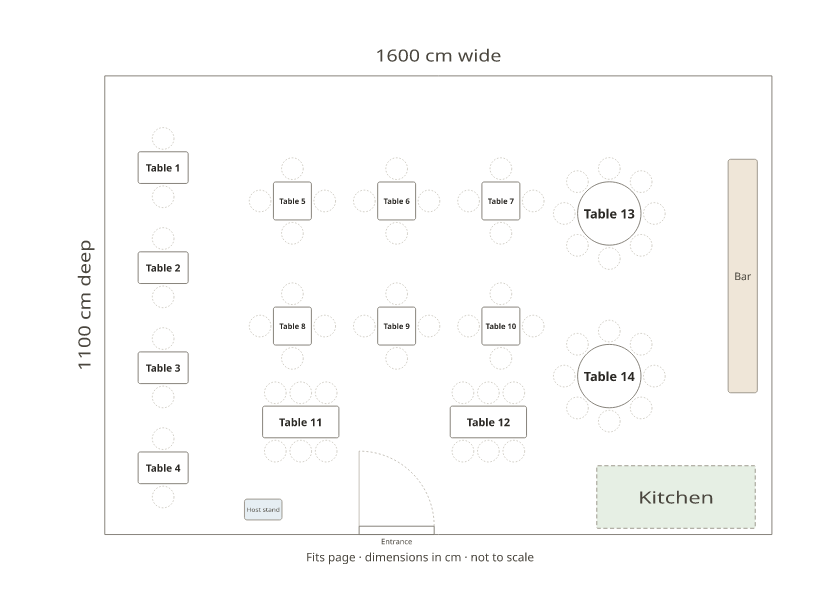
- Draw the dining room. Start from the example restaurant or blank, set the room size, and add two-tops, four-tops, long tables and rounds from the Add menu.
- Number the tables. Tables are numbered as you add them; click one to change its number, name it (“Patio 1”) or change its seats.
- Add the bar and stations. Place the bar, host stand, kitchen and doors, and drag everything to where it really is.
- Print the floor plan. Download the floor plan as a PDF or image for the host stand, or the table list as Excel.
- Seat a private party. For an event, add the guest list and press Smart arrange to seat everyone at your tables.
The plan above is a 16 by 11 metre dining room with 14 tables and 60 seats: four two-tops by the window, six four-tops, two six-tops and two rounds of 8, with the bar, kitchen, host stand and entrance. Press Use this layout to make it yours.
A seating chart for the host stand
Hosts seat parties from a map of the room: every table’s number and seats, and which server has which section. Number or name the tables the way your team says them (“Table 12”, “Patio 3”, “A1”), print the floor plan on Letter or A4, and mark the sections. Name tables by section and the plan shows the sections for you. Keep a copy for each shift if your sections change.
Table sizes
| Table | Seats | In the chart |
|---|---|---|
| Two-top | 2 | Long table with 2 seats |
| Four-top | 4 | Square table |
| Six-top | 6 | Long table with 6 seats |
| Round eight-top | 8 | Round table (60-inch) |
| Pushed-together tables | 8 or more | One long table, with or without end seats |
Private parties and events
For a rehearsal dinner, a birthday or a company dinner in the restaurant, add the guest list (paste it or import a spreadsheet) with each guest’s party, and press Smart arrange. Then print the floor plan with names, a list for each table for the servers, and place cards from the seating card maker.
Restaurant seating chart template
PDF, Letter · PDF, A4 · Excel table list
Frequently asked questions
Is there a free restaurant seating chart maker?
Yes. Draw your dining room with numbered tables, a bar and stations, and print it, free and with no sign-up. It’s a floor plan and seating tool, not a reservation or waitlist system.
What is a hostess seating chart?
A map of the dining room with every table’s number and seats, kept at the host stand so the host can seat parties evenly across sections. Print the floor plan above and mark each server’s section on it.
Is there a restaurant seating chart template in Excel?
Yes. The Excel file below lists every table and its seats; edit it, or import a guest list for a private event.
How do I show server sections?
Name the tables by section (A1, A2, B1…) so the floor plan shows them, or draw each section as a labelled area.
Can I plan a private event in the restaurant?
Yes. Add the guests with their party, and Smart arrange seats everyone at your tables; the PDF prints the floor plan with names and a list for each table.
Does it work for a café or a bar?
Yes. Use smaller tables and fewer of them, and draw the counter and bar stools as a bar with a row of chairs.