Canva Seating Chart Maker: an Honest Comparison
What Canva does well for seating charts, where it gets slow, and when a seating chart generator is the better fit, or how to use both.
Checked on October 18, 2026, from Canva’s public seating chart page and help centre. Canva changes often; check their site for current plans. This site isn’t affiliated with Canva.
The short answer
- Canva is a design tool. It’s excellent for a beautiful seating chart sign, but you type every name and decide every seat yourself.
- A seating chart generator is a seating tool. You paste the guest list, it seats people by your rules, and it prints the plan, the lists and the sign from the same names.
- Many people use both: plan the seating in a generator, then make the sign there or bring it into Canva to decorate.
Where Canva is better
- Design freedom. Ready-made templates, over a hundred free fonts and millions of free photos and graphics. If the sign is part of your wedding stationery, Canva can match it.
- Everything else in one place. Invitations, menus, programs and table numbers in the same style, in the same account.
- Designing together. You can invite others to edit the same design.
- Printing. Canva Print can print the finished chart for you.
Where a seating chart generator is better
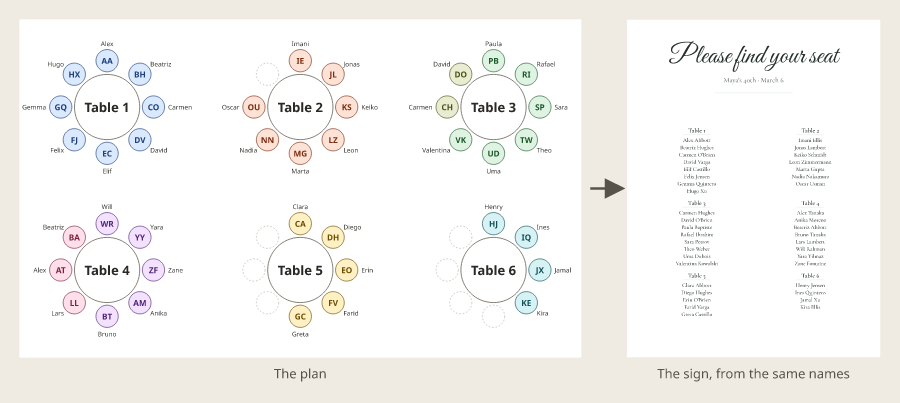
- It seats people for you. Paste your guest list, add tables and press Smart arrange; households stay together and rules (keep apart, keep together, seat near) are followed.
- It counts. You always see who’s unseated and which table is over, instead of counting text boxes.
- Change once, everywhere. Move a guest and the floor plan, the A–Z list, the per-table lists for the caterer and the sign all update.
- No account, no watermark. Free, with no sign-up, and downloads have no watermark. Your plans stay in your own browser.
Side by side
| Feature | Canva | Seating chart generator (this site) |
|---|---|---|
| What it is | Design tool with seating chart templates | Seating tool with a sign maker |
| Guest list | Typed into text boxes | Pasted or imported from a spreadsheet |
| Who sits where | You decide every seat | Smart arrange with your rules, then adjust by hand |
| Floor plan | Drawn with shapes | Tables, seats, dance floor and doors to scale |
| Lists for caterer and entrance | Made separately | From the same plan (PDF) |
| Design options | Very wide: templates, fonts, graphics | Four sign styles at eight print sizes |
| Working with others | Invite others to edit | Share a read-only link; one person edits |
| Account | A free account to save your designs | None |
| Cost | Free plan; Pro elements and some features paid | Free |
How to make a seating chart in Canva
- Search Canva for “seating chart” and pick a template (wedding, classroom and event designs are available).
- Replace the sample names with yours, one text box per table or a list per table.
- Adjust fonts, colours and graphics; keep the names in a clear font.
- Download a print-ready PDF, or order prints.
Decide the seating before step 2: moving one guest in Canva means editing two text boxes by hand. Our guide on how to make a seating chart covers the planning.
Using both
- Plan the seating in the wedding seating chart generator (or the classroom one).
- Make the sign in the seating chart sign maker and download it as a PNG, SVG or PDF.
- Upload it to Canva and add your artwork around it, or print it as it is.
- For place cards from your list in Canva, export the guest list as CSV for Bulk Create (a paid Canva feature), or use our seating card maker.
For more ways to display a chart, see wedding seating chart ideas and seating chart wording and fonts.
Frequently asked questions
Is Canva free for seating charts?
Canva’s free plan lets you design and download a seating chart. Some templates and graphics are Pro elements: on the free plan they carry a watermark unless you buy them or upgrade, and some download options are for paid plans only.
Can Canva make a seating chart automatically?
No. Canva is a design tool: you type each name into a text box and arrange the layout yourself. A seating chart generator seats guests for you from a list, following rules such as keeping families together.
Can I import a guest list into Canva?
Canva’s Bulk Create can fill designs from spreadsheet data, which suits place cards. It’s available on paid plans such as Canva Pro, on desktop. It doesn’t decide who sits where.
Does Canva have wedding and classroom seating chart templates?
Yes. Canva’s library has many seating chart designs, including wedding and quinceañera charts, and classroom designs. You replace the sample text with your own names.
Can I use a sign from this site in Canva?
Yes. The seating chart sign maker downloads your sign as a PNG, SVG or PDF with no watermark. You can upload it to Canva and add graphics around it, so the names never have to be retyped.
Which is better for a wedding seating chart, Canva or a seating chart generator?
For deciding who sits where, a seating chart generator. For a decorative sign with custom artwork, Canva. Many couples plan in a generator and then make the final sign in a design tool, or use the generator’s own sign maker.